 Customer Service Software Guides & AI Agent Blogs | Udesk
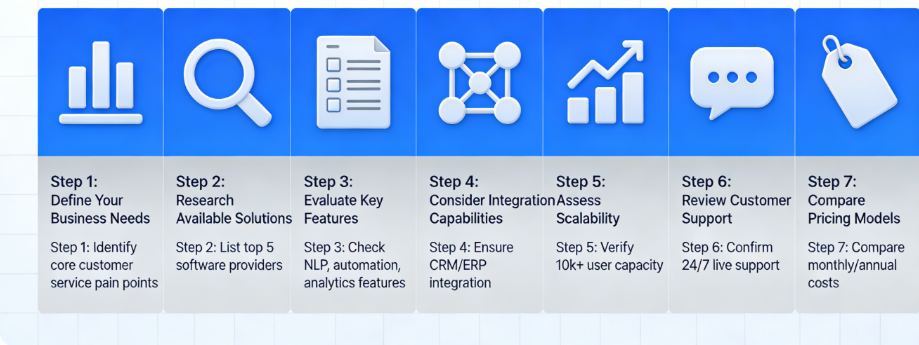
How to Choose the Best AI Customer Service Software in 2026 (7-Step Guide)
article summary:This 7-step guide cuts through the noise, focusing on actionable criteria tailored to 2026’s market trends. We’ll help you align the software with your business goals, avoid costly mistakes, and select a solution that scales with you—whether you’re a small e-commerce store or a multinational corporation. By the end, you’ll have a clear roadmap to pick an AI customer service tool that doesn’t just “work”—it transforms your CX, reduces costs, and turns customers into loyal advocates.



Table of contents for this article
- Step 1: Define Your Core Business Needs (Don’t Start with Features)
- Step 2: Prioritize Non-Negotiable Features (Focus on 2026’s Must-Haves)
- a. Advanced LLM-Powered Intent Recognition
- b. Seamless Multi-Channel Integration
- c. AI Agent Automation (Beyond Basic FAQs)
- d. Compliance & Data Security
- Step 3: Evaluate Integration Capabilities (Avoid Tech Silos)
- Step 4: Assess AI Accuracy & Customization (Avoid “One-Size-Fits-All”)
- Step 5: Calculate Total Cost of Ownership (TCO) & ROI
- a. TCO Breakdown
- b. ROI Calculation
- Step 6: Test with a Free Trial (Don’t Skip This!)
- Step 7: Check Reviews & Case Studies (Learn from Real Users)
- Final Thoughts: Choose a Tool That Scales with You
- FAQs (Frequently Asked Questions)
- 》》Click to start your free trial of Udesk customer service solution, and experience the advantages firsthand.
Step 1: Define Your Core Business Needs (Don’t Start with Features)
-
What’s your primary goal? Are you looking to reduce support costs (e.g., cutting 30% of manual tickets), improve response times (aiming for sub-1-second replies), boost customer satisfaction (CSAT), or drive revenue (e.g., upselling during support chats)? For example, e-commerce brands might prioritize order tracking automation and refund processing, while B2B companies may focus on complex query resolution and CRM integration.
-
Who is your audience? Do you serve global customers (needing 24/7 multilingual support) or a local market? Are your customers primarily on social media (WhatsApp, Instagram DMs) or traditional channels (email, phone)? Cross-border businesses, especially those serving the EU, must prioritize GDPR compliance—a non-negotiable for avoiding fines and building trust.
-
What’s your team size and technical expertise? Small teams (1–5 support agents) need tools that require minimal setup (no coding, 3-minute deployment) and built-in templates, like Tidio AI or Helpcrunch. Enterprise teams with dedicated IT departments can handle complex setups, such as Zendesk AI’s scalable automation or Salesforce Service Cloud’s custom workflows.
Step 2: Prioritize Non-Negotiable Features (Focus on 2026’s Must-Haves)
a. Advanced LLM-Powered Intent Recognition
Gone are the days of keyword-based chatbots that fail to understand nuanced queries. The best tools in 2026 use LLMs to achieve 98%+ intent recognition accuracy, meaning they can interpret context, sarcasm, and follow-up questions (e.g., “My order didn’t arrive—can I get a refund or a replacement?” instead of just “Where’s my order?”). Look for tools like Ada or Chat Base, which use your own knowledge base (KB, docs, CRM data) to deliver context-specific answers—critical for avoiding generic, frustrating responses.
b. Seamless Multi-Channel Integration
Customers in 2026 expect to reach you on their preferred channel—and switch between channels without repeating themselves (e.g., starting a chat on Instagram, continuing via email). The best software unifies all channels (website chat, email, social media, SMS, in-app messaging) into a single dashboard. Top picks include Hiver (for clean human handoff) and Freshchat AI (for chat and messaging app support). Avoid tools that silo channels—this creates extra work for your team and a disjointed CX.
c. AI Agent Automation (Beyond Basic FAQs)
The most valuable AI tools in 2026 don’t just answer FAQs—they complete full workflows independently. Look for AI Agents that can: pull customer data from your CRM, process refunds, update order statuses, and escalate complex issues to human agents with full context (so customers don’t repeat themselves). For example, Gorgias AI is ideal for e-commerce teams, as it handles orders, refunds, and fulfillment actions seamlessly, while Forethought AI prepares high-volume tickets before agents touch them.
d. Compliance & Data Security
With global regulations like GDPR (EU), CCPA (California), and PIPL (China) becoming stricter, compliance is non-negotiable. Choose tools that are 100% GDPR-compliant, store data in region-specific servers (e.g., EU-based servers for European customers), and offer audit trails and data encryption. Herodesk, a Nordic tool, is a standout here—it’s built for GDPR compliance from the ground up, making it ideal for cross-border businesses. Skip tools that require you to manually configure compliance settings—this is a time sink and risk factor.
Step 3: Evaluate Integration Capabilities (Avoid Tech Silos)
Your AI customer service software shouldn’t exist in a vacuum—it needs to integrate with the tools you already use to avoid manual data entry and disjointed workflows. In 2026, the best tools offer pre-built integrations with popular platforms, plus low-code/no-code options for custom connections. Prioritize these integrations based on your tech stack:
-
CRM Tools: Salesforce, HubSpot, Zoho CRM. Zendesk AI and HubSpot Chatbot excel here—Zendesk integrates seamlessly with Salesforce, syncing accounts, contacts, and tickets in real time, while HubSpot automatically updates CRM records from chat conversations.
-
E-Commerce Platforms: Shopify, WooCommerce, Amazon. Gorgias AI and Tidio AI are tailored for e-commerce, with pre-built integrations for order management and inventory tracking.
-
Help Desk & Ticketing Tools: Freshdesk, Jira. Tools like SupportAI integrate directly with ticketing systems, drafting agent replies using context and past conversations to speed up resolution.
Test the integration during the free trial (Step 6!) to ensure it’s seamless. A tool that requires manual data syncing or complex coding defeats the purpose of AI-driven efficiency.
Step 4: Assess AI Accuracy & Customization (Avoid “One-Size-Fits-All”)
Not all AI is created equal—even top tools can underperform if they’re not customized to your business. In 2026, the best software lets you train the AI on your brand’s voice, products, and customer pain points. Here’s how to evaluate this:
-
Customization Options: Can you upload your knowledge base (FAQs, product docs, policies) to train the AI? Can you adjust the tone (friendly, formal, casual) to match your brand? Chat Base and Botisfy stand out here—Chat Base builds AI on your own data, while Botisfy lets you control rule-driven automation for precise, brand-aligned responses.
-
Accuracy Testing: Run a test with 10–15 common customer queries (e.g., “How do I return a product?” “What’s your shipping time?”). Does the AI provide accurate, relevant answers without prompting? Does it handle follow-up questions (e.g., “Can I return a sale item?”) smoothly? Aim for 90%+ accuracy on routine queries—anything lower will frustrate customers and increase agent workload.
-
Continuous Learning: Does the AI learn from customer interactions and agent feedback? The best tools use machine learning to improve over time—for example, if the AI misinterprets a query, an agent can correct it, and the AI will avoid the mistake in the future. This ensures your tool gets better as you use it, rather than becoming obsolete.
Step 5: Calculate Total Cost of Ownership (TCO) & ROI
Many businesses focus on monthly subscription costs and overlook hidden expenses—leading to sticker shock later. In 2026, calculate the total cost of ownership (TCO) and projected ROI to ensure the tool is a smart investment. Here’s how:
a. TCO Breakdown
-
Subscription Fees: Most tools charge per agent/month (ranging from $15 for small teams to $100+ for enterprise plans). Watch for tiered pricing—some tools lock key features (like multi-channel support or AI automation) behind higher tiers.
-
Setup & Training Costs: Enterprise tools may require paid onboarding (up to $1,000+) or IT support. Lightweight tools like Tidio AI and Herodesk offer free setup and intuitive interfaces, reducing training time to hours, not days.
-
Integration Costs: Custom integrations (if needed) can cost $500–$5,000+ depending on complexity. Prioritize tools with pre-built integrations to avoid this.
b. ROI Calculation
Use this simple formula to project ROI (based on industry averages): $$ROI = ((Service Efficiency Gains + Revenue Growth) - TCO) / TCO × 100%$$
-
Service Efficiency Gains: Calculate time saved by agents (e.g., 10 agents × 5 hours/week saved × $20/hour = $4,000/month) and reduced churn (e.g., 5% churn reduction × $100,000 monthly revenue = $5,000/month).
-
Revenue Growth: AI-driven upselling (e.g., 2% conversion rate on support chats × 1,000 chats/month × $50 average order value = $1,000/month) and improved CSAT (higher retention and referrals).
Example: A mid-sized e-commerce brand with 10 agents might spend $500/month on a tool with $1,000 one-time setup. If the tool saves 50 hours/week (=$4,000/month) and drives $1,000/month in upsells, ROI is ((5,000 - 1,500)/1,500) × 100% = 233% in the first month—an easy justification for the investment.
Step 6: Test with a Free Trial (Don’t Skip This!)
In 2026, 95% of AI customer service tools offer a free trial (7–14 days)—take advantage of this to test the tool in real-world scenarios. This is your chance to avoid costly mistakes—even the most hyped tools can fail to meet your needs in practice. Focus on these test areas:
-
Usability: Can your support team learn the tool in a day? Is the dashboard intuitive? Avoid tools with steep learning curves—they’ll slow down your team and reduce adoption.
-
AI Performance: Test the AI with real customer queries (use past tickets for authenticity). Does it resolve issues without agent intervention? How well does it handle complex or unusual queries?
-
Integration Functionality: Connect the tool to your CRM or e-commerce platform. Does data sync in real time? Are workflows automated as expected?
-
Customer Support: Reach out to the tool’s support team with a question. How fast do they respond? Are they helpful? A tool that offers 24/7 support is critical—you don’t want to be stuck with a broken AI during peak hours.
Pro Tip: Involve your support team in the trial—they’ll be the ones using the tool daily, so their feedback is invaluable. If the team struggles with the tool, it won’t matter how powerful it is—adoption will be low.
Step 7: Check Reviews & Case Studies (Learn from Real Users)
Finally, validate your choice with real-world feedback. In 2026, trusted review platforms like G2, Capterra, and Trustpilot are goldmines for honest insights—avoid relying solely on the vendor’s marketing materials. Here’s what to look for:
-
Reviews from Similar Businesses: A tool that works for a enterprise SaaS company may not work for a small café. Look for reviews from businesses in your industry and of your size. For example, small teams often praise Tidio AI for its quick setup, while large teams highlight Zendesk AI’s scalability.
-
Common Pain Points: Do reviewers complain about poor AI accuracy, clunky integrations, or hidden fees? If multiple reviews mention the same issue, it’s a red flag.
-
Case Studies: Vendors often share case studies of customers with similar goals (e.g., “How Company X reduced support costs by 40% with our AI”). Look for specific metrics (not just vague claims) to confirm the tool delivers on its promises. For example, Herodesk’s case studies show that中小微电商 using its tool saw a 40%+ improvement in response speed and 10–15 hours saved per month.
Final Thoughts: Choose a Tool That Scales with You
In 2026, the best AI customer service software isn’t just a tool—it’s a long-term partner. As your business grows, your needs will change: you’ll add more channels, hire more agents, and expand to new markets. Choose a tool that can scale with you—avoid “one-and-done” solutions that will require a costly switch in 6–12 months.
Remember: The goal isn’t to find the “most powerful” tool—it’s to find the one that aligns with your goals, integrates with your tech stack, and makes your team’s job easier. By following these 7 steps, you’ll cut through the noise, avoid common pitfalls, and select an AI customer service solution that transforms your CX, reduces costs, and drives growth in 2026 and beyond.
FAQs (Frequently Asked Questions)
-
Is AI customer service software suitable for small businesses? Absolutely. Tools like Udesk, Helpcrunch, and Herodesk offer affordable, lightweight plans with minimal setup—perfect for small teams. Many even have free tiers for startups to test the tool before committing.
-
How long does it take to deploy AI customer service software? Lightweight tools can be deployed in 30 minutes to a day. Enterprise tools may take 1–2 weeks (including onboarding and customization). Look for tools with pre-built templates to speed up deployment.
-
Will AI replace human support agents? No—2026’s AI tools are designed for human-AI collaboration. AI handles routine queries, freeing agents to focus on complex issues, building relationships, and high-value tasks. The most successful teams use AI as a helper, not a replacement.
c. AI Agent Automation (Beyond Basic FAQs)
The most valuable AI tools in 2026 don’t just answer FAQs—they complete full workflows independently. Look for AI Agents that can: pull customer data from your CRM, process refunds, update order statuses, and escalate complex issues to human agents with full context (so customers don’t repeat themselves). For example, Gorgias AI is ideal for e-commerce teams, as it handles orders, refunds, and fulfillment actions seamlessly, while Forethought AI prepares high-volume tickets before agents touch them.
d. Compliance & Data Security
With global regulations like GDPR (EU), CCPA (California), and PIPL (China) becoming stricter, compliance is non-negotiable. Choose tools that are 100% GDPR-compliant, store data in region-specific servers (e.g., EU-based servers for European customers), and offer audit trails and data encryption. Herodesk, a Nordic tool, is a standout here—it’s built for GDPR compliance from the ground up, making it ideal for cross-border businesses. Skip tools that require you to manually configure compliance settings—this is a time sink and risk factor.
Step 3: Evaluate Integration Capabilities (Avoid Tech Silos)
Your AI customer service software shouldn’t exist in a vacuum—it needs to integrate with the tools you already use to avoid manual data entry and disjointed workflows. In 2026, the best tools offer pre-built integrations with popular platforms, plus low-code/no-code options for custom connections. Prioritize these integrations based on your tech stack:
-
CRM Tools: Salesforce, HubSpot, Zoho CRM. Zendesk AI and HubSpot Chatbot excel here—Zendesk integrates seamlessly with Salesforce, syncing accounts, contacts, and tickets in real time, while HubSpot automatically updates CRM records from chat conversations.
-
E-Commerce Platforms: Shopify, WooCommerce, Amazon. Gorgias AI and Tidio AI are tailored for e-commerce, with pre-built integrations for order management and inventory tracking.
-
Help Desk & Ticketing Tools: Freshdesk, Jira. Tools like SupportAI integrate directly with ticketing systems, drafting agent replies using context and past conversations to speed up resolution.
Test the integration during the free trial (Step 6!) to ensure it’s seamless. A tool that requires manual data syncing or complex coding defeats the purpose of AI-driven efficiency.
Step 4: Assess AI Accuracy & Customization (Avoid “One-Size-Fits-All”)
Not all AI is created equal—even top tools can underperform if they’re not customized to your business. In 2026, the best software lets you train the AI on your brand’s voice, products, and customer pain points. Here’s how to evaluate this:
-
Customization Options: Can you upload your knowledge base (FAQs, product docs, policies) to train the AI? Can you adjust the tone (friendly, formal, casual) to match your brand? Chat Base and Botisfy stand out here—Chat Base builds AI on your own data, while Botisfy lets you control rule-driven automation for precise, brand-aligned responses.
-
Accuracy Testing: Run a test with 10–15 common customer queries (e.g., “How do I return a product?” “What’s your shipping time?”). Does the AI provide accurate, relevant answers without prompting? Does it handle follow-up questions (e.g., “Can I return a sale item?”) smoothly? Aim for 90%+ accuracy on routine queries—anything lower will frustrate customers and increase agent workload.
-
Continuous Learning: Does the AI learn from customer interactions and agent feedback? The best tools use machine learning to improve over time—for example, if the AI misinterprets a query, an agent can correct it, and the AI will avoid the mistake in the future. This ensures your tool gets better as you use it, rather than becoming obsolete.
Step 5: Calculate Total Cost of Ownership (TCO) & ROI
Many businesses focus on monthly subscription costs and overlook hidden expenses—leading to sticker shock later. In 2026, calculate the total cost of ownership (TCO) and projected ROI to ensure the tool is a smart investment. Here’s how:
a. TCO Breakdown
-
Subscription Fees: Most tools charge per agent/month (ranging from $15 for small teams to $100+ for enterprise plans). Watch for tiered pricing—some tools lock key features (like multi-channel support or AI automation) behind higher tiers.
-
Setup & Training Costs: Enterprise tools may require paid onboarding (up to $1,000+) or IT support. Lightweight tools like Tidio AI and Herodesk offer free setup and intuitive interfaces, reducing training time to hours, not days.
-
Integration Costs: Custom integrations (if needed) can cost $500–$5,000+ depending on complexity. Prioritize tools with pre-built integrations to avoid this.
b. ROI Calculation
Use this simple formula to project ROI (based on industry averages): $$ROI = ((Service Efficiency Gains + Revenue Growth) - TCO) / TCO × 100%$$
-
Service Efficiency Gains: Calculate time saved by agents (e.g., 10 agents × 5 hours/week saved × $20/hour = $4,000/month) and reduced churn (e.g., 5% churn reduction × $100,000 monthly revenue = $5,000/month).
-
Revenue Growth: AI-driven upselling (e.g., 2% conversion rate on support chats × 1,000 chats/month × $50 average order value = $1,000/month) and improved CSAT (higher retention and referrals).
Example: A mid-sized e-commerce brand with 10 agents might spend $500/month on a tool with $1,000 one-time setup. If the tool saves 50 hours/week (=$4,000/month) and drives $1,000/month in upsells, ROI is ((5,000 - 1,500)/1,500) × 100% = 233% in the first month—an easy justification for the investment.
Step 6: Test with a Free Trial (Don’t Skip This!)
In 2026, 95% of AI customer service tools offer a free trial (7–14 days)—take advantage of this to test the tool in real-world scenarios. This is your chance to avoid costly mistakes—even the most hyped tools can fail to meet your needs in practice. Focus on these test areas:
-
Usability: Can your support team learn the tool in a day? Is the dashboard intuitive? Avoid tools with steep learning curves—they’ll slow down your team and reduce adoption.
-
AI Performance: Test the AI with real customer queries (use past tickets for authenticity). Does it resolve issues without agent intervention? How well does it handle complex or unusual queries?
-
Integration Functionality: Connect the tool to your CRM or e-commerce platform. Does data sync in real time? Are workflows automated as expected?
-
Customer Support: Reach out to the tool’s support team with a question. How fast do they respond? Are they helpful? A tool that offers 24/7 support is critical—you don’t want to be stuck with a broken AI during peak hours.
Pro Tip: Involve your support team in the trial—they’ll be the ones using the tool daily, so their feedback is invaluable. If the team struggles with the tool, it won’t matter how powerful it is—adoption will be low.
Step 7: Check Reviews & Case Studies (Learn from Real Users)
Finally, validate your choice with real-world feedback. In 2026, trusted review platforms like G2, Capterra, and Trustpilot are goldmines for honest insights—avoid relying solely on the vendor’s marketing materials. Here’s what to look for:
-
Reviews from Similar Businesses: A tool that works for a enterprise SaaS company may not work for a small café. Look for reviews from businesses in your industry and of your size. For example, small teams often praise Tidio AI for its quick setup, while large teams highlight Zendesk AI’s scalability.
-
Common Pain Points: Do reviewers complain about poor AI accuracy, clunky integrations, or hidden fees? If multiple reviews mention the same issue, it’s a red flag.
-
Case Studies: Vendors often share case studies of customers with similar goals (e.g., “How Company X reduced support costs by 40% with our AI”). Look for specific metrics (not just vague claims) to confirm the tool delivers on its promises. For example, Herodesk’s case studies show that中小微电商 using its tool saw a 40%+ improvement in response speed and 10–15 hours saved per month.
Final Thoughts: Choose a Tool That Scales with You
In 2026, the best AI customer service software isn’t just a tool—it’s a long-term partner. As your business grows, your needs will change: you’ll add more channels, hire more agents, and expand to new markets. Choose a tool that can scale with you—avoid “one-and-done” solutions that will require a costly switch in 6–12 months.
Remember: The goal isn’t to find the “most powerful” tool—it’s to find the one that aligns with your goals, integrates with your tech stack, and makes your team’s job easier. By following these 7 steps, you’ll cut through the noise, avoid common pitfalls, and select an AI customer service solution that transforms your CX, reduces costs, and drives growth in 2026 and beyond.
FAQs (Frequently Asked Questions)
-
Is AI customer service software suitable for small businesses? Absolutely. Tools like Udesk, Helpcrunch, and Herodesk offer affordable, lightweight plans with minimal setup—perfect for small teams. Many even have free tiers for startups to test the tool before committing.
-
How long does it take to deploy AI customer service software? Lightweight tools can be deployed in 30 minutes to a day. Enterprise tools may take 1–2 weeks (including onboarding and customization). Look for tools with pre-built templates to speed up deployment.
-
Will AI replace human support agents? No—2026’s AI tools are designed for human-AI collaboration. AI handles routine queries, freeing agents to focus on complex issues, building relationships, and high-value tasks. The most successful teams use AI as a helper, not a replacement.
Step 3: Evaluate Integration Capabilities (Avoid Tech Silos)
-
CRM Tools: Salesforce, HubSpot, Zoho CRM. Zendesk AI and HubSpot Chatbot excel here—Zendesk integrates seamlessly with Salesforce, syncing accounts, contacts, and tickets in real time, while HubSpot automatically updates CRM records from chat conversations.
-
E-Commerce Platforms: Shopify, WooCommerce, Amazon. Gorgias AI and Tidio AI are tailored for e-commerce, with pre-built integrations for order management and inventory tracking.
-
Help Desk & Ticketing Tools: Freshdesk, Jira. Tools like SupportAI integrate directly with ticketing systems, drafting agent replies using context and past conversations to speed up resolution.
Step 4: Assess AI Accuracy & Customization (Avoid “One-Size-Fits-All”)
-
Customization Options: Can you upload your knowledge base (FAQs, product docs, policies) to train the AI? Can you adjust the tone (friendly, formal, casual) to match your brand? Chat Base and Botisfy stand out here—Chat Base builds AI on your own data, while Botisfy lets you control rule-driven automation for precise, brand-aligned responses.
-
Accuracy Testing: Run a test with 10–15 common customer queries (e.g., “How do I return a product?” “What’s your shipping time?”). Does the AI provide accurate, relevant answers without prompting? Does it handle follow-up questions (e.g., “Can I return a sale item?”) smoothly? Aim for 90%+ accuracy on routine queries—anything lower will frustrate customers and increase agent workload.
-
Continuous Learning: Does the AI learn from customer interactions and agent feedback? The best tools use machine learning to improve over time—for example, if the AI misinterprets a query, an agent can correct it, and the AI will avoid the mistake in the future. This ensures your tool gets better as you use it, rather than becoming obsolete.
Step 5: Calculate Total Cost of Ownership (TCO) & ROI
a. TCO Breakdown
-
Subscription Fees: Most tools charge per agent/month (ranging from $15 for small teams to $100+ for enterprise plans). Watch for tiered pricing—some tools lock key features (like multi-channel support or AI automation) behind higher tiers.
-
Setup & Training Costs: Enterprise tools may require paid onboarding (up to $1,000+) or IT support. Lightweight tools like Tidio AI and Herodesk offer free setup and intuitive interfaces, reducing training time to hours, not days.
-
Integration Costs: Custom integrations (if needed) can cost $500–$5,000+ depending on complexity. Prioritize tools with pre-built integrations to avoid this.
b. ROI Calculation
Use this simple formula to project ROI (based on industry averages): $$ROI = ((Service Efficiency Gains + Revenue Growth) - TCO) / TCO × 100%$$
-
Service Efficiency Gains: Calculate time saved by agents (e.g., 10 agents × 5 hours/week saved × $20/hour = $4,000/month) and reduced churn (e.g., 5% churn reduction × $100,000 monthly revenue = $5,000/month).
-
Revenue Growth: AI-driven upselling (e.g., 2% conversion rate on support chats × 1,000 chats/month × $50 average order value = $1,000/month) and improved CSAT (higher retention and referrals).
Example: A mid-sized e-commerce brand with 10 agents might spend $500/month on a tool with $1,000 one-time setup. If the tool saves 50 hours/week (=$4,000/month) and drives $1,000/month in upsells, ROI is ((5,000 - 1,500)/1,500) × 100% = 233% in the first month—an easy justification for the investment.
Step 6: Test with a Free Trial (Don’t Skip This!)
In 2026, 95% of AI customer service tools offer a free trial (7–14 days)—take advantage of this to test the tool in real-world scenarios. This is your chance to avoid costly mistakes—even the most hyped tools can fail to meet your needs in practice. Focus on these test areas:
-
Usability: Can your support team learn the tool in a day? Is the dashboard intuitive? Avoid tools with steep learning curves—they’ll slow down your team and reduce adoption.
-
AI Performance: Test the AI with real customer queries (use past tickets for authenticity). Does it resolve issues without agent intervention? How well does it handle complex or unusual queries?
-
Integration Functionality: Connect the tool to your CRM or e-commerce platform. Does data sync in real time? Are workflows automated as expected?
-
Customer Support: Reach out to the tool’s support team with a question. How fast do they respond? Are they helpful? A tool that offers 24/7 support is critical—you don’t want to be stuck with a broken AI during peak hours.
Pro Tip: Involve your support team in the trial—they’ll be the ones using the tool daily, so their feedback is invaluable. If the team struggles with the tool, it won’t matter how powerful it is—adoption will be low.
Step 7: Check Reviews & Case Studies (Learn from Real Users)
Finally, validate your choice with real-world feedback. In 2026, trusted review platforms like G2, Capterra, and Trustpilot are goldmines for honest insights—avoid relying solely on the vendor’s marketing materials. Here’s what to look for:
-
Reviews from Similar Businesses: A tool that works for a enterprise SaaS company may not work for a small café. Look for reviews from businesses in your industry and of your size. For example, small teams often praise Tidio AI for its quick setup, while large teams highlight Zendesk AI’s scalability.
-
Common Pain Points: Do reviewers complain about poor AI accuracy, clunky integrations, or hidden fees? If multiple reviews mention the same issue, it’s a red flag.
-
Case Studies: Vendors often share case studies of customers with similar goals (e.g., “How Company X reduced support costs by 40% with our AI”). Look for specific metrics (not just vague claims) to confirm the tool delivers on its promises. For example, Herodesk’s case studies show that中小微电商 using its tool saw a 40%+ improvement in response speed and 10–15 hours saved per month.
Final Thoughts: Choose a Tool That Scales with You
In 2026, the best AI customer service software isn’t just a tool—it’s a long-term partner. As your business grows, your needs will change: you’ll add more channels, hire more agents, and expand to new markets. Choose a tool that can scale with you—avoid “one-and-done” solutions that will require a costly switch in 6–12 months.
Remember: The goal isn’t to find the “most powerful” tool—it’s to find the one that aligns with your goals, integrates with your tech stack, and makes your team’s job easier. By following these 7 steps, you’ll cut through the noise, avoid common pitfalls, and select an AI customer service solution that transforms your CX, reduces costs, and drives growth in 2026 and beyond.
FAQs (Frequently Asked Questions)
-
Is AI customer service software suitable for small businesses? Absolutely. Tools like Udesk, Helpcrunch, and Herodesk offer affordable, lightweight plans with minimal setup—perfect for small teams. Many even have free tiers for startups to test the tool before committing.
-
How long does it take to deploy AI customer service software? Lightweight tools can be deployed in 30 minutes to a day. Enterprise tools may take 1–2 weeks (including onboarding and customization). Look for tools with pre-built templates to speed up deployment.
-
Will AI replace human support agents? No—2026’s AI tools are designed for human-AI collaboration. AI handles routine queries, freeing agents to focus on complex issues, building relationships, and high-value tasks. The most successful teams use AI as a helper, not a replacement.
-
Service Efficiency Gains: Calculate time saved by agents (e.g., 10 agents × 5 hours/week saved × $20/hour = $4,000/month) and reduced churn (e.g., 5% churn reduction × $100,000 monthly revenue = $5,000/month).
-
Revenue Growth: AI-driven upselling (e.g., 2% conversion rate on support chats × 1,000 chats/month × $50 average order value = $1,000/month) and improved CSAT (higher retention and referrals).
Step 6: Test with a Free Trial (Don’t Skip This!)
-
Usability: Can your support team learn the tool in a day? Is the dashboard intuitive? Avoid tools with steep learning curves—they’ll slow down your team and reduce adoption.
-
AI Performance: Test the AI with real customer queries (use past tickets for authenticity). Does it resolve issues without agent intervention? How well does it handle complex or unusual queries?
-
Integration Functionality: Connect the tool to your CRM or e-commerce platform. Does data sync in real time? Are workflows automated as expected?
-
Customer Support: Reach out to the tool’s support team with a question. How fast do they respond? Are they helpful? A tool that offers 24/7 support is critical—you don’t want to be stuck with a broken AI during peak hours.
Step 7: Check Reviews & Case Studies (Learn from Real Users)
-
Reviews from Similar Businesses: A tool that works for a enterprise SaaS company may not work for a small café. Look for reviews from businesses in your industry and of your size. For example, small teams often praise Tidio AI for its quick setup, while large teams highlight Zendesk AI’s scalability.
-
Common Pain Points: Do reviewers complain about poor AI accuracy, clunky integrations, or hidden fees? If multiple reviews mention the same issue, it’s a red flag.
-
Case Studies: Vendors often share case studies of customers with similar goals (e.g., “How Company X reduced support costs by 40% with our AI”). Look for specific metrics (not just vague claims) to confirm the tool delivers on its promises. For example, Herodesk’s case studies show that中小微电商 using its tool saw a 40%+ improvement in response speed and 10–15 hours saved per month.
Final Thoughts: Choose a Tool That Scales with You
FAQs (Frequently Asked Questions)
-
Is AI customer service software suitable for small businesses? Absolutely. Tools like Udesk, Helpcrunch, and Herodesk offer affordable, lightweight plans with minimal setup—perfect for small teams. Many even have free tiers for startups to test the tool before committing.
-
How long does it take to deploy AI customer service software? Lightweight tools can be deployed in 30 minutes to a day. Enterprise tools may take 1–2 weeks (including onboarding and customization). Look for tools with pre-built templates to speed up deployment.
-
Will AI replace human support agents? No—2026’s AI tools are designed for human-AI collaboration. AI handles routine queries, freeing agents to focus on complex issues, building relationships, and high-value tasks. The most successful teams use AI as a helper, not a replacement.
》》Click to start your free trial of Udesk customer service solution, and experience the advantages firsthand.

The article is original by Udesk, and when reprinted, the source must be indicated:https://www.udeskglobal.com/blog/how-to-choose-the-best-ai-customer-service-software-in-2026-7-step-guide.html
Customer Service Softwarecustomer service system